Taking a passport photo seems easy and usually only takes a couple of seconds. The tricky part is getting it right so it doesn’t hold up your application for weeks. The U.S. Department of State says unacceptable photos are the number one reason it puts passport applications on hold. As expected, “can you smile in a passport photo?” is searched thousands of times a month.
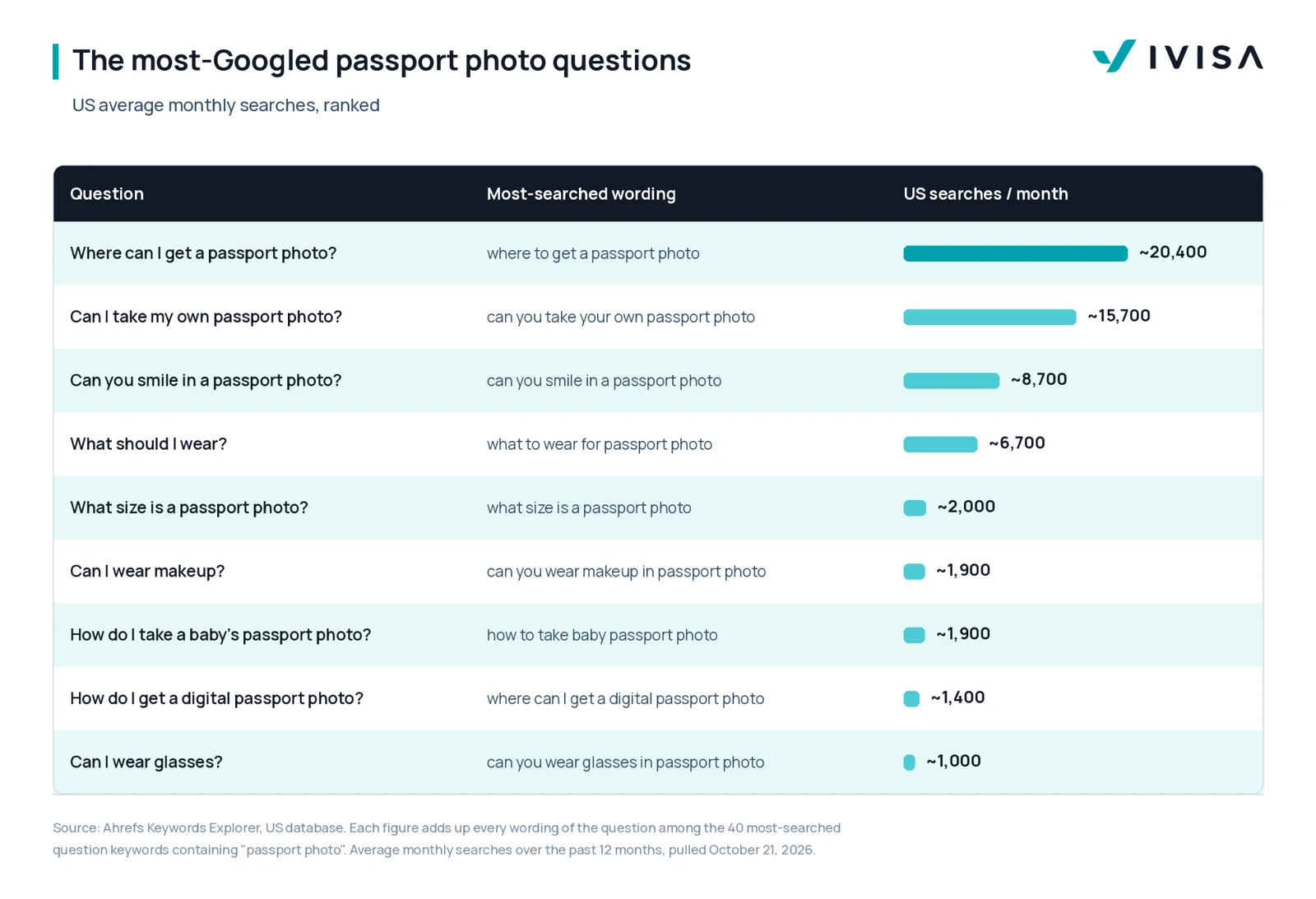
iVisa has pulled the most-searched passport photo questions and sent them to the team that reviews visa application photos every day. Here are nine questions people Google most in the U.S., ranked by average monthly searches.
1. Where can you get a passport photo?
With iVisa, you don’t need to go anywhere: your phone is enough, and it’s the simplest way to do it. Take the photo on your phone and upload it straight into your application. We’ll give you all the recommendations you need to make your photo compliant with the rules for the document you’re applying for: a plain, light background, even lighting, and no filters.
Before you submit your application, our internal photo compliance check and our experts give your photo a final review. They look for issues like blurriness, incorrect framing, or a background that doesn’t meet the requirements. If it needs a retake, we’ll tell you exactly what to change before your application is submitted.
Not every iVisa document needs one, though. For example, the UK ETA, India eVisa, and Vietnam eVisa all require a traveler’s photo alongside your passport photo page, while arrival cards like the India e-Arrival Card don’t. Whenever a photo is required, our experts and tools review it with the rest of your application before anything is submitted.
iVisa expert tip: Before you upload, check that your head is centered, your face is evenly lit, and nothing is blurry. Retaking a photo takes a minute; an application put on hold takes much longer.
2. Can you take your own passport photo at home?
With iVisa: yes, and it’s the simplest way to do it. Take the photo on your phone and upload it straight into your application. Use a plain, light background, face the camera in even light, and don’t add filters.
Our experts and tools can check for common home photo issues: shadows, a busy background, incorrect framing, or blurriness. If it needs a retake, we’ll tell you exactly what to change before your application is submitted.
To get it right on a phone at home:
- Stand 3 to 4 feet (about 1 meter) from a plain white or off-white wall. A white sheet over a colored wall works too.
- Face a window so natural light falls evenly on your face, with no shadows on your face or the wall behind you.
- Have someone else hold the phone at your eye level. Arm’s-length selfies tend to distort your face and make your head the wrong size in the frame.
- Use the camera’s highest-quality setting, and don’t add filters, beauty modes, or any edits.
- Keep your head and shoulders centered and fully in the frame.
A few details that catch people out:
- Lighting: You need even light across your face. Overhead lights or a lamp off to one side can cast shadows that hide your features. Photos that are too bright or too dark will also be rejected.
- Pose: Face the camera directly, without tilting or turning your head, and keep your shoulders square to the camera.
- Background: It must be plain white or off-white, with no shadows, texture, patterns, or objects. If your wall isn’t white, hang a white sheet or blanket over it.
- No digital fixes: Don’t remove or replace the background with an app. Fix the lighting and background, then retake the photo.
iVisa expert tip: Take five or six shots and pick the one with the most even lighting. Shadows behind the ears and under the chin are the easiest problems to miss.
3. Can you smile in a passport photo?
It depends on the document. Visa and travel authorization photos follow the destination’s rules, which aren’t always the same as passport rules. For any iVisa application, a neutral expression with your mouth closed and eyes open is the safest choice.
Expression is one of the things our review team checks, along with head position and whether your eyes are clearly visible. If something could cause a problem, we’ll flag it before your application is submitted.
The smile rule is the same for children, but babies and toddlers must have a neutral expression.
iVisa expert tip: If you’re not sure your smile counts as natural, go neutral. A relaxed face is never the reason a photo gets flagged.
4. What should you wear for a passport photo?
Wear everyday clothes and keep your face fully visible. If you wear a head covering for religious or medical reasons, keep your full face uncovered and free of shadows.
Because rules differ by destination, we check your photo against the requirements for the specific visa or travel document you’re applying for. If that document has extra rules, we’ll let you know before you submit.
Wear what you’d normally wear day to day. A plain top with a simple neckline works best. Jewelry and facial piercings are fine as long as they don’t hide any part of your face.
iVisa expert tip: Avoid a white top against a white background. Your shoulders can blend into the wall, making the photo harder to read.
5. What size is a passport photo?
When applying with iVisa, photo sizes vary by country. The U.S. uses 2 x 2 inches, while China, India, and the UK each have their own metric sizes. You upload a digital photo, and our photo compliance check flags incorrect dimensions and framing, so you don’t have to measure anything yourself.
What you can control is distance: stand 3 to 4 feet (about 1 meter) from the camera to avoid distortion, with your head, neck, and shoulders centered.
How to get it right:
- Distance matters the most: Stand several feet away from the camera. If the person taking the photo is too close or too far away, your head won’t be the right size once it’s printed.
- Center your head and shoulders: Your full head has to be in the photo. Hair can extend past the edges, as long as the whole head is shown and the size is correct.
iVisa expert tip: Wrong head size is one of the most common problems we see in photos taken at home. Leave space around your head and shoulders so the photo can be cropped correctly.
6. Can you wear makeup in a passport photo?
We recommend keeping it minimal. For visa photos, it’s usually best to skip lipstick, flashy jewelry, and other eye-catching elements.
Also, don’t apply any filter, beauty mode, or editing app before you upload it. Send the original: if the background or image quality needs work, our team uses specialized tools to adjust the background and enhance the quality as part of the review.
Officially, there is no rule against makeup, as long as your photo still looks like you and your face is clearly visible.
iVisa expert tip: Matte products photograph better than shimmer. Shine can read as glare and wash out your features.
7. How do you take a baby’s passport photo?
Every traveler needs their own photo when the document requires one, including babies. Usually, it’s best to lay the baby on a plain white sheet and take the picture. At iVisa, one of our experts reviews each child’s photo and runs it through our photo compliance check.
Some extra points for younger children:
- No shadows on the face. This is easy to miss when you’re leaning over a baby to take the photo, so make sure the room is well lit and stand to the side of the light.
- No exaggerated expressions. Sticking out a tongue or covering the mouth with a hand will get the photo rejected.
- Toddlers and older children follow the same rules as adults, including having their eyes open. Only babies get an exception.
- No one else in the shot. If you need to support your baby’s head, keep your hands completely out of the frame.
iVisa expert tip: Try taking the picture right after a feed or a nap, when babies are calmest. Take lots of shots; you only need one.
8. How do you get a digital passport photo?
You complete every iVisa application online, so your photo is always digital. Upload the original file directly from the phone or camera you used, along with your passport photo page. Avoid screenshots, scans of printed photos, and photos sent through messaging apps, which lose quality.
We review your photo as part of your application, and our fulfillment team works around the clock so you don’t have to wait for a separate photo check. The file needs to be:
- A JPG, JPEG, PNG, HEIC, or HEIF (most phone photos already are)
- The original image, not a photo of a printed photo or a scan
We recommend not texting the photo to yourself, as that can reduce quality. You can crop and reposition the photo during the upload, and a member of staff still reviews it after you apply.
iVisa expert tip: Upload straight from the phone you took it on, or transfer it by cable or cloud. Messaging apps compress photos.
9. Can you wear glasses in passport photos?
Usually, it’s best to take them off. Many governments ban glasses in visa photos entirely, and even where they’re allowed, glare on the lenses can get a photo rejected because it hides your eyes. Even if you wear glasses all day, it’s safer to take the photo without them.
If you can’t remove your glasses for medical reasons, contact our support team before you upload.
iVisa expert tip: Take your glasses off a few minutes before the photo so the marks on your nose fade.
The most common reasons passport photos get flagged
Most rejected photos fail for a handful of avoidable reasons, and almost none of them are about how you look. These are the five most common problems iVisa sees:
- Shadows: Harsh lighting can cast shadows behind your ears or on one side of your face, which facial recognition software may misread as part of your features.
- Glare on glasses: Reflections hide your eyes, the most important reference point for facial recognition.
- A busy background: Colored walls, wallpaper, wood grain, or a dark background make it harder to pick out your outline.
- The wrong dimensions: Sizes vary by country, and photos that must be stretched or squeezed to fit are rejected.
- Expression and composition: Wide smiles, squinting, or a tilted head.
A compliant photo is one of the simplest ways to avoid a delay, and one of the easiest things to get slightly wrong. To see how our review catches each of these before you submit, read how the iVisa photo guarantee works.