Key points
- Non-compliant photos are one of the most common reasons visa applications get delayed or rejected.
- Biometric facial recognition is unforgiving: shadows, glare on glasses, busy backgrounds, wrong dimensions, and non-neutral expressions all trigger failures.
- iVisa combines country-specific guidance, an AI compliance check, and human review before submission to catch issues early.
- Simple habits at home, natural window light, a plain wall, a neutral expression, dramatically improve acceptance rates.
Visa photo requirements are stricter than most people realize. A selfie or snapshot that does not meet a government’s rules is one of the most common reasons applications get rejected or delayed. At iVisa, getting your photo right is something we treat as a priority rather than an afterthought.
Why visa photos get rejected: it’s a system thing
Government agencies rely on biometric facial recognition software built into modern passports and visas. When you pass through an e-gate at an airport, a computer compares your live face against the digital map stored in your travel document.
Shadows, glare on eyeglasses, or a dark background cause problems because the math stops adding up for the computer. When the software cannot read your facial features with full certainty, it errs on the side of rejection to avoid a security mismatch.
The 5 most common reasons your passport photo gets rejected
1. The ghost shadow
- Problem: High-contrast lighting creates shadows behind the ears or on one side of the face.
- Why it matters: Shadows obscure your facial topography. Biometric scanners can read a shadow as a structural feature, which distorts the measurement of your jawline, ears, or nose.
2. The spectacle glare
- Problem: Many governments ban eyeglasses entirely, and even where they are allowed, reflections on the lenses cause an automatic rejection.
- Why it matters: Glare blocks the eyes, which are the most important anchor point for facial recognition.
- Pro tip: Just take your glasses off. Even if you wear them all day, it is safer to take the photo without them.
3. The busy background
- Problem: Colorful walls, visible textures such as wallpaper or wood grain, or dark backgrounds.
- Why it matters: Most visas require a plain, stark white or light-colored background. A patterned background interferes with the software’s ability to identify your silhouette.
4. The wrong dimensions
- Problem: Photo sizes vary by country. The USA uses 2x2 inches, while China, India, and the UK each have different metric requirements.
- Why it matters: Incorrect dimensions force the system to stretch or squish your face, which triggers an automatic rejection.
- For the US specifically: our guide to the US visa photo requirements covers the full specification, including the pixel and file-size limits for the DS-160 upload.
5. Expression and composition
- Problem: Wide smiles, squinting, or a tilted head.
- Why it matters: A neutral expression keeps your facial muscles relaxed, which allows for accurate feature mapping.
The iVisa photo difference: how we help you avoid rejections
Generic photo booths and basic smartphone apps lack country-specific knowledge. The UK ETA app’s live-selfie feature, for example, is notorious for rejections, largely because of strict passport-style requirements and the app’s high-sensitivity cameras.
iVisa takes a different approach, combining data with human review.
- Matched to the country you’re applying to. We keep photo requirements up to date and give you specific instructions for taking a compliant photo for your document type.
- iVisa photo compliance check. Our AI detects issues such as poor lighting, incorrect dimensions, improper framing, and formatting problems, then guides you through the corrections.
- Expert human review. Unlike government portals that reject a photo only after you submit it, iVisa photos are reviewed by our fulfillment experts before they go to the government. The team catches and fixes issues like shadows or head tilts.
As Sabri Capriles, our Fulfillment Strategy & Operations Manager, puts it: “We understand that behind every application is a traveler with a deadline and a dream trip on the line.”
How to take the perfect photo for your visa application
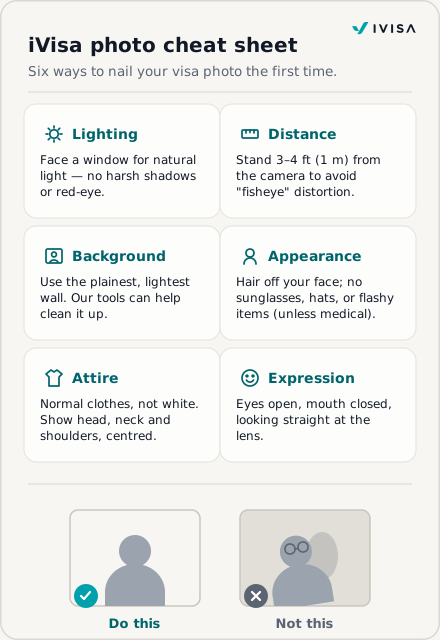
Follow these guidelines when taking your photo:
- Lighting: Face a window with natural light to avoid harsh shadows and red-eye.
- Distance: Stand 3 to 4 feet (about 1 meter) from the camera to prevent fisheye distortion.
- Background: Use the plainest, lightest wall available. Our tools can help clean it up afterward.
- Expression: Keep your eyes open, your mouth closed, and look directly at the lens.
- Attire: Wear normal clothes, avoid white, and show your head, neck, and shoulders with your head centered.
- Appearance: Make sure your hair does not cover your face, and skip flashy elements, lipstick, sunglasses, jewelry, or head coverings (except for medical or religious reasons).
The consequences of a rejected photo are real: missed flights, lost visa fees, non-refundable hotel bookings, and time spent waiting on an embassy hold.
Frequently asked questions about visa photos
Can I smile in my visa photo?
Most countries require a neutral facial expression. A tiny, closed-mouth smile is sometimes okay, but a toothy grin will almost always lead to a rejection.
What if I don’t have a perfectly white wall at home?
Our team uses specialized tools to adjust the background and enhance quality. Just find the plainest, lightest wall you can.
How long does it take for iVisa to review my photo?
Our fulfillment team works around the clock. In most cases, your photo is reviewed as part of your application process, so no time is lost.